Intro
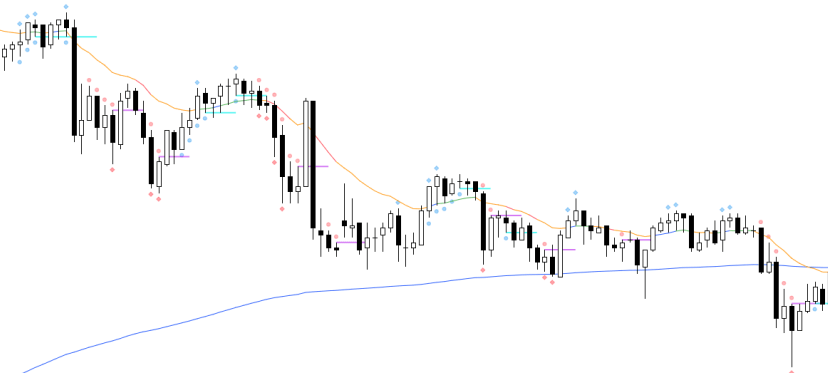
Please find a spike break indicator for research
Indicator
https://www.tradingview.com/script/EcZyPa3A-Zen-Spike-Break-v1/

Code
For those that are interested the code is here.
//@version=5
indicator(‘Zen_Spike_Break_v1’, overlay=true, max_lines_count = 500)
bool plotspiketermination = input.string(“On”, “Show spike termination?”, options = [“On”, “Off”]) == “On”
bool plot4H_or_4L = input.string(“On”, “Show 4 Highs or Lows?”, options = [“On”, “Off”]) == “On”
bool plot4trendingshape = input.string(“On”, “Show 4 Trending?”, options = [“On”, “Off”]) == “On”
//Ignore Bars
x = input.int(3, “Number of Bars to Ignore at Start of Day”)
new_day = dayofweek != dayofweek[1]
bars_since_new_day = ta.barssince(new_day)
ignore_signals = bars_since_new_day < x
//What is current bar
isUp = close > open
isDown = close < open
isBullBar = close – open > 0
isBearBar = close – open < 0
isBullBO = close > close[1] and low >= low[1]
isBearBO = close < close[1] and high <= high[1]
isOutside = high >= high[1] and low <= low[1]
isOutsideUp = high >= high[1] and low <= low[1] and isUp
isOutsideDown = high >= high[1] and low <= low[1] and isDown
isInside = high <= high[1] and low >= low[1]
// What is Prior Bar
priorbarisInside = high[1] < high[2] and low[1] > low[2]
priorbarisbull = close[1] > open[1]
priorbarisbear = close [1] < open[1]
priorpriorbarisbull = close[2] > open[2]
priorpriorbarisbear = close [2] < open[2]
priorpriorbarisInside = high[2] < high[3] and low[2] > low[3]
priorbarisoutside = high[1] > high[2] and low[1] < low[2]
priorpriorbarisoutside = high[2] > high[3] and low[2] < low[3]
//details
threeCloseabovetwo = close > high[1]
threeClosebelowtwo = close < low[1]
priorbarlowaboveppbarlow = low[1] > low[2]
priorbarhighbelowppbarhigh = high[1] < high[2]
//noinsides
noInsides = not isInside and not priorbarisInside and not priorpriorbarisInside
noOutsides = not isOutside and not priorbarisoutside and not priorpriorbarisoutside
//trendingshapes4
fourtrendinglowsbull = low > low[1] and low[1] > low[2] and low[2] > low[3]
fourtrendinghighsbear = high < high[1] and high[1] < high[2] and high[2] < high[3]
plot4trendinglowsbull = fourtrendinglowsbull and plot4trendingshape == true and not ignore_signals
plot4trendinghighsbear = fourtrendinghighsbear and plot4trendingshape == true and not ignore_signals
plotshape(plot4trendinglowsbull, “4 Trending HL”, style = shape.circle , color=color.rgb(33, 149, 243, 60), location=location.belowbar)
plotshape(plot4trendinghighsbear, “4 Trending LH”, style = shape.circle, color=color.rgb(255, 82, 82, 60), location=location.abovebar)
spiketermination_bull = fourtrendinglowsbull[1] and not fourtrendinglowsbull and plotspiketermination == true
spiketermination_bear = fourtrendinghighsbear[1] and not fourtrendinghighsbear and plotspiketermination == true
if spiketermination_bull
line.new(x1 = bar_index[1], y1 = low[1], x2 = bar_index + 3, y2 = low[1], color = color.rgb(7, 238, 238, 31), width = 2)
//
if spiketermination_bear
line.new(x1 = bar_index[1], y1 = high[1], x2 = bar_index + 3, y2 = high[1], color = color.rgb(172, 7, 238, 50), width = 2)
//
//
four_highs = high > high[1] and high[1] > high[2] and high[2] > high[3] and plot4H_or_4L == true
four_lows = low < low[1] and low[1] < low[2] and low[2] < low[3] and plot4H_or_4L == true
plotshape(four_highs, “4 Trending HH”, style = shape.diamond, color=color.rgb(33, 149, 243, 60), location=location.abovebar)
plotshape(four_lows, “4 Trending LL”, style = shape.diamond, color=color.rgb(255, 82, 82, 50), location=location.belowbar)



 Zen Trading Tech
Leave a comment